RDUMesh.org FAQ
You have questions. We have answers.

Comprehensive MeshCore FAQ - Beginner to Advanced
Building a Resilient Off-Grid Mesh Network in Central North Carolina
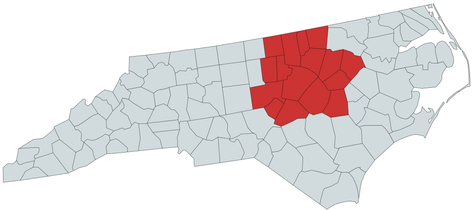
Welcome to RDUMesh! This comprehensive guide covers everything you need to know about building and using the MeshCore mesh network in the Raleigh-Durham-Chapel Hill (Triangle) area of Central North Carolina and eventually extending it out to all counties serviced by the RDU airport.
MeshCore is an open-source, off-grid mesh network system that enables secure text messaging using LoRa radios operating on the 915 MHz ISM band - no licenses, internet or cell service required.
Critical: RDUMesh uses MeshCore, not Meshtastic. These are different systems with different architectures. Some key differences: In MeshCore, companion nodes (personal devices) do NOT repeat messages. Only repeater nodes relay traffic. Messages can be repeated by up to 64 nodes to get to where they need to be. This planned infrastructure approach creates a more reliable, scalable network.
Our Philosophy: RDUMesh is designed to work when the internet and power grid fail. We do NOT use the internet to interconnect nodes that couldn't otherwise connect via RF. If we have connectivity problems, we solve them with better repeater placement and RF solutions - not internet backhauls. The mesh must be resilient and independent.
Table of Contents:
• Part 1: Getting Started with MeshCore
• Part 2: Hardware Recommendations
• Part 3: Antenna Selection and Configuration
• Part 4: Height is Might - Elevation Strategies
• Part 5: Wardriving and Network Discovery
• Part 6: How to Help the Community
• Part 7: Privacy and Anonymity - The Reality
• Part 8: Advanced Topics and Network Strategy
PART 1: Getting Started with MeshCore
Q: What is MeshCore and how is it different from Meshtastic?
A: MeshCore is an open-source mesh networking and communication system using LoRa (Long Range) radio technology on the 915 MHz ISM band in the United States. Here's what makes it different:
• Planned Infrastructure: MeshCore requires dedicated repeater nodes for network coverage beyond the range of a single node. Companion nodes (personal devices) do NOT repeat messages*(1) - they only send and receive on behalf of their owner. This prevents network flooding and collisions.
• Higher Hop Limits: MeshCore currently supports up to 64 hops (versus 3-7 in Meshtastic), enabling messages to traverse larger geographic areas, assuming proper repeater placement.
• Efficient Routing: MeshCore uses hybrid flood-then-direct routing. Initial messages flood to discover paths, then subsequent messages use known routes for efficiency.
• Lower Telemetry Overhead: MeshCore minimizes unnecessary telemetry traffic, conserving bandwidth for actual messages.
Bottom Line: MeshCore is designed for planned, scalable mesh networks with fixed repeater infrastructure - ideal for covering regions like the 16 counties served by RDU airport.
Q: What are the different types of MeshCore devices?
A: MeshCore has distinct firmware types for different roles:
• BLE Companion: A personal device that connects to your smartphone via Bluetooth. You carry this for messaging. Companions do NOT repeat messages for others*(1) - they only send and receive your own communications. This is likely what you'd want first to get started. If you're going to keep your companion mobile, consider blanking its location as to not confuse the mesh when you're clearly not where you say you are.
• Repeater: Stationary infrastructure nodes placed at high elevations that relay messages across the network. These are the backbone of the mesh and should run 24/7.
• Room Server: A store-and-forward message server that holds messages for offline users and delivers them when they reconnect. Can also act as a repeater.
• Ripple GUI, MeshOS, Others with a GUI : Standalone devices (like T-Deck/T-Deck Plus) with screen and keyboard - complete messaging devices that don't require a smart phone like the BLE companions.
Key Point: Unlike other systems, MeshCore companions do NOT participate in routing. This is by design to mitigate network congestion.
Q: How do I flash MeshCore firmware to my device?
A: Use the MeshCore Web Flasher:
• Step 1: NEVER power on your device without an antenna attached! This can permanently damage the radio chip.
• Step 2: Open Chrome or Edge browser (required for WebUSB) and go to: https://flasher.meshcore.co.uk
• Step 3: Connect your device via USB cable (verify it's a data cable, not charge-only).
• Step 4: Select your device type and firmware role (BLE Companion for personal devices, Repeater for infrastructure). Decide whether you aant to fully erase the device before flashing. Erasing is good if this is the first time you're flashing the device. It'll clear out any settings from a previous firmware. If you're upgrading your firmware and want to keep your existing identity/settings, DO NOT erase.
• Step 5: Figure out which serial device yours is. You may benefit from cycling/resetting it while the serial device discovery popup is open so you know for sure you're picking the right thing. (Some devices require pressing or holding a button while resetting/powering it up to put it into a "DFU" mode to accept firmware updates first.)
• Step 6: Click Flash and wait for completion.
• Step 7 (Companions): After flashing, look for the Bluetooth pin on the display to connect your iOS/Android device. If you don't have a display, your pin will be initialized to 123456. (Make sure to change that soon.) Get logged in via the MeshCore app, set your region to US Recommended, and give your new companion a name.
• Step 7 (Repeaters): After flashing, click 'Repeater Setup' in the flasher to configure. Set region to 'US Recommended', set name and position.
Q: How do I connect to my MeshCore companion device?
A: You'll need the MeshCore Android/iOS app:
• Step 1: Download the MeshCore app onto your smartphone/tablet
• Step 2: Power on your companion device (flashed with BLE Companion firmware).
• Step 3: Open the app, tap to add a device, and select your companion from the Bluetooth list.
• Step 4: Enter the pairing PIN if prompted (default is shown in device documentation).
Important: Only BLE Companion firmware supports Bluetooth connection. Repeater firmware cannot be connected via Bluetooth by design - repeaters are configured via USB or remotely over RF.
Q: What settings do I need to configure for the RDU area?
A: Essential configuration:
• Region/Preset (REQUIRED): Set to 'US Recommended' in the app or flasher. This configures the correct 915 MHz frequency and radio parameters for the United States:
Frequency: 910.525 MHz
Bandwidth: 62.5 kHz
Spreading Factor: 7
Coding Rate: 5
Transmit Power: (depends on your hardware and preferences.)
• Position (Optional): You can set your GPS coordinates manually in settings. For companions, this is optional. For repeaters, manually setting the position is recommended and appreciated (and can be intentionally inaccurate for security by a couple hundred feet).
• Send a Flood Routed Advert: After setup, tap the signal/wave icon in the app to broadcast ("Advert") your presence to the mesh. Unlike other systems, MeshCore only discovers nodes when they send adverts - you must manually advertise yourself. Repeaters can, and should, Advert on a schedule automatically.
Patience is Key: Remember, you may not see other contacts immediately. MeshCore only discovers nodes when they send adverts, so it takes time to build your contact list. If you see 'Heard {x} repeat(s)' when sending a message, you're connected to the mesh!
PART 2: Hardware Recommendations
Q: What hardware does RDUMesh recommend for beginners?
A: There is another article that goes into detail here: Recommended Hardware
Q: Where can I buy MeshCore hardware?
A: Check out the Recommended Hardware article for links to stores we tend to like
Q: What's the best transceiver hardware for solar-powered repeaters?
A: Solar repeaters are the backbone of RDUMesh. Prioritize low power consumption:
• RAK4631 WisBlock: The gold standard. nRF52840 chip is extremely power-efficient. Use with RAK19003 or RAK19007 base board. Add RAKwireless solar panel (5.5 x 3.5 inch panels work great) and large LiPo battery (5000-10000mAh).
• PeakMesh (seller on Etsy): Fully assembled solar nodes with specs like: RAK4631, 5000mAh battery, dual 1W panels, and weatherproof housing. These can charge even indoors with decent window light and maintain charge through winter in trees. Some of this seller's devices are designed to hang from trees, magnetically stick to poles or the roof of your car, be mounted on walls or fences, etc..
• Seeed Studio Wio-SX1262 + XIAO nRF52840: Budget option (~$14) for DIY solar builds. Very power-efficient.
• Much (but not all) of the hardware supported by Meshtastic can also support MeshCore.
Q: Should I use GPS on my repeater?
A: GPS is generally NOT useful on repeaters:
• Manual Configuration Works Better: Repeater owners typically manually set coordinates in the configuration and leave them alone. This saves power and works perfectly for stationary nodes.
• Security Consideration: Some operators intentionally provide slightly inaccurate coordinates to make the physical repeater harder to locate, steal, report to authorities, or destroy. Please only "fudge" your location by a couple hundred feet, max. Our signal propagation modelling systems rely on somewhat accurate coordinates.
• Power Savings: GPS modules consume extra power. For solar nodes with limited panel capacity, skipping GPS extends battery life.
• When GPS Helps: Mobile companion nodes without smartphones benefit from GPS for position reporting. But for fixed repeaters, manual coordinates are the way to go.
Q: What about the RAK13302 1-watt radio module?
A: The RAK13302 high-power module can transmit at up to 1 watt (30dBm):
• Power Requirements: Needs 5V internally but has a built-in voltage booster. Can run from standard 3.7V LiPo battery via WisBlock base board.
• When to Use: Rarely needed in the Piedmont. Better antenna placement and elevation matter far more than transmit power. Save your money. If you want to do it anyway and have money to burn, talk to the back haul strategy team. Otherwise, consider maybe adding a band pass filter to your repeater build.
• RDUMesh Strategy: We don't need stronger transmitters. We need well-placed high-elevation repeaters with good antennas. A standard RAK4631 mounted at 100+ feet AGL (Above Ground Level) with good horizon views can outperform a 1W radio at ground level practically every time.
• Legal Limits: A 1W radio paired with the right antenna is right on or even slightly over the legal limits for transmitting on the 915MHz ISM band. Improper use at or beyond this power level might get you in legal trouble. Ask a licensed HAM operator for details.
Q: What firmware should I use for my Heltec V4 repeater?
A: For Heltec V4 repeaters, use the newest firmware (1.13 at the time of this writing) build that includes Pull Request #1398. This PR modifies hardware registers to improve noise floor and SNR, resulting in better reception. Look for recent MeshCore firmware builds that mention PR#1398.
PART 3: Antenna Selection and Configuration
Q: What antenna should I use for a companion node?
A: For mobile companion devices:
• Stock Stubby Antennas: Work but are the weakest link. Acceptable for testing but upgrade when possible.
• Quarter-Wave Whip (17cm): Significant improvement, still pocketable.
• Half-Wave Dipole (37cm): Best performance if you can handle the length. Excellent for wardriving.
• Omni Pattern Required: Stick with omnidirectional antennas for mobile use to hear nodes in all directions.
• Antenna dBi?: More dBi (AKA gain) isn't always better. For a companion node, 5dBi is more than enough. 3dBi may even be better since repeaters might be above you and higher gain reduces your signal's ability to reach others above or below you.
Q: What antenna should I use for a repeater?
A: For fixed repeater installations:
• 5-6 dBi Omni (Recommended): The sweet spot. Excellent gain without sacrificing vertical coverage. This is the standard for RDUMesh backbone repeaters.
• 2-3 dBi Omni: Better for lower installations (20-30 feet) where you need maximum vertical spread.
• 8+ dBi High Gain (Not Recommended): Generally avoid in the Piedmont unless you're on a TV tower trying to reach another TV tower 2-3 counties away. High gain focuses the radiation pattern, making it poor at talking to nodes that aren't directly in front of (or in the case of high-dBi omnis, beside) the antenna.
Q: Why not use high-gain antennas (>5.8 dBi)?
A: In the Piedmont, there's limited benefit:
• Vertical Pattern Compression: Higher gain omni antennas achieve gain by flattening the radiation pattern horizontally while reducing vertical coverage. If you're high up talking to nodes on the ground, this works against you.
• When High Gain Works: Only for high-to-high long-distance links. Even then, LoRa distance records were set with 5-6 dBi antennas using good elevation and clear line of sight.
• Height is Might: Better elevation with a modest antenna beats high gain at lower heights almost universally.
Q: Should I use directional antennas?
A: The answer for most people:
Stop making things complicated and just put up more repeaters in great places.
If you have good tall locations, a 5-6 dBi omni will give excellent performance with line of sight in all directions. Directional antennas are rarely worth the complexity in the Piedmont. Find a tall tree on a hill and string up your repeater as high as you can get it.
PART 4: Height is Might - Elevation Strategies
The most important factors in mesh network coverage are elevation and line of sight (LoS). A repeater at 200 feet up on a tower with a basic antenna outperforms a ground-level node with the fanciest antenna money can buy.
Q: Why is height so important?
A: Radio signals travel in straight lines:
• Line of Sight: At ground level, buildings, trees, and terrain block signals within blocks. At 100+ feet, you have clear line of sight for miles in multiple directions.
• Fresnel Zone Clearance: Radio signals need clear space around the direct path. Height helps you clear obstacles.
• Real Example: Users regularly hear the Mount Mitchell repeater from across the region - not because of fancy equipment, but because it's at 6,684 feet elevation.
Q: I have access to tall buildings, trees, towers, or light poles. Can I help?
YES! We'd love to talk to you!
We're actively seeking people with access and permission to high places with skyline views. Contact RDUMesh on Discord if you have access to:
• Tall buildings (rooftops in Raleigh, Durham, Chapel Hill, Cary)
• Antenna masts or radio towers
• High light poles or water towers
• Very tall trees on hilltops
• Fire towers, grain silos, or rural factories
A small solar-powered MeshCore repeater is about the size of a large soda can with an antenna. These are self-contained and run autonomously for long periods without maintenance.
Q: Do solar nodes work in trees under canopy?
A: Yes, with the right approach:
• Pines: Fairly thin canopy. You get clear skies if you dangle a meter or two down from a high limb. Tall, lone pines in hilltops are ideal for tree installations.
• Deciduous Trees: More challenging. Winter is fine, summer may need oversized panels and batteries. Community members report nodes in oak trees maintaining 72-73% charge through winter.
• The Trade-off: Height in trees outweighs foliage attenuation. A node 60 feet up in a tree outperforms a rooftop node at 20 feet.
Q: What's the RDUMesh coverage vision?
A: Cover the 16 counties served by RDU airport with a three-tier architecture:
• Tier 1 - Backbone Repeaters: High-elevation sites (200+ feet, hilltops, towers) with excellent omni antennas covering 10+ mile radius. We may need only 5 to 10 per county.
• Tier 2 - Distribution Nodes: Rooftop nodes, tree installations at 50-150 feet. Connect to backbone and distribute coverage within neighborhoods.
• Tier 3 - Last Mile: Lower elevation repeaters. As long as these have line of sight to Tier 2 nodes, they don't need to be above trees.
• Current Focus: Establishing Tier 1 backbone. Once that's in place, Tier 2 and 3 become much easier.
PART 5: Wardriving and Network Discovery
Q: What is wardriving for MeshCore?
A: Wardriving is driving around with a MeshCore companion device to discover and map repeaters and coverage. You can identify coverage gaps, test signal strength, and gather data to improve the network - all while the data gets uploaded to mapping services when you have internet connectivity.
Q: How do I start wardriving?
A: Here's how:
• Get MeshMapper: Sign up for the MeshMapper app (currently in TestFlight for iOS). Ask in the RDUMesh Discord for an invitation link.
• Use a Decent Antenna: External omni antenna recommended - dipole or whip between 17cm and 34cm (quarter-wave to half-wave) significantly improves reception over stock stubby antennas or antennas inside your vehicle.
• Enable GPS: Make sure your companion device has GPS enabled so MeshMapper can plot where you discovered each repeater.
• Drive and Log: Drive around with your companion powered on, MeshMapper app running, and actively pinging. It automatically logs all repeaters you hear.
• Having Trouble?: Chat with us in Discord and someone will be able to help you out.
Q: What should my noise floor be when wardriving?
A: Noise floor depends on environment and hardware:
• Ideal Quiet Environment: Around -110 dB or lower indicates minimal interference.
• Heltec V4: The Low Noise Amplifier may inject noise, so around -95 dB is typical. Newer firmware with PR#1398 may help improve this.
• Context Matters: Urban areas have higher noise floors than rural areas.
Q: I found a repeater that shows up gray/offline in MeshMapper. What do I do?
A: Help grow the network:
• Step 1: Return to that area and get within range.
• Step 2: Use your MeshCore app to discover the repeater and see it in your contact list.
• Step 3: Send the owner a friendly message on their public channel inviting them to join RDUMesh and Discord.
• Why: Many people set up repeaters but don't know about local communities. Your outreach connects isolated nodes to the larger network.
PART 6: How to Help the Community
Q: I have a location with power and data. Would that help?
A:
We stick with solar and off the internet. Here's why:
• Off-Grid Resilience (THE Key Reason): RDUMesh is designed to work when the internet and power grid fail. Grid power fails during hurricanes, ice storms, and emergencies - exactly when we need the mesh most. Solar nodes keep working when everything else is down.
• Cost: Solar hardware can be cheaper and require zero ongoing electricity costs.
• Simplicity: Self-contained solar nodes don't require running cables or dealing with electrical codes.
Our Philosophy: We do NOT want the internet used to interconnect nodes that couldn't otherwise connect via RF. If we have connectivity problems, we solve them with better repeater placement and RF solutions - not internet backhaul.
Q: Can I monitor the mesh and send data to the internet?
A: Yes! This is different from using the internet for routing:
• Observer Nodes Are Welcome: You can set up observer nodes that listen to the mesh and report data to services like MeshRank, LetsMesh.net, or MeshMapper. These help with wardriving, network analytics, and understanding coverage.
• What Observers Do: Observer nodes listen silently and upload what they hear to internet services for mapping and analysis. They don't participate in routing - they just observe.
• The Key Distinction: Monitoring/reporting is fine. Using the internet to route mesh messages is not aligned with RDUMesh goals. The mesh must work WITHOUT the internet.
Q: What's the best way to help if I'm not technical?
A: You don't need technical skills to make huge impact:
• Access to Locations: Know people with tall buildings, property owners, or connections to organizations with towers/rooftops? That's incredibly valuable. You can connect RDUMesh members to prime installation sites.
• Community Building: Spread the word. Talk to neighbors, local emergency preparedness groups, and community organizations.
• Run a Node: Even just keeping a node powered on at your house contributes. Every companion helps, every repeater is critical.
• Wardriving: Drive around discovering repeaters and helping isolated operators connect to the community.
PART 7: Privacy and Anonymity - The Reality
Q: Just how anonymous is MeshCore?
A: Let's be realistic about anonymity:
• You're Transmitting on RF: You're broadcasting on a radio frequency with a transmitter. The fact that you're transmitting and that your transmitter has a unique identity (public key) significantly limits TRUE anonymity.
• Message Traces Exist: Messages may traverse multiple repeaters to reach their destination. Each hop creates a trace showing the path your message took through the network. Those repeaters have known locations.
• Observer Nodes: Some nodes are configured as observers that report information about the mesh, telemetry, traces, and messages to the public internet (services like MeshRank, LetsMesh.net). These help with mapping and analytics but reduce anonymity.
• Encryption Varies: Peer-to-peer direct messages use encryption. However, messages posted to public chat rooms are in clear text to anyone within range of that room and its repeaters.
• Physical Location: If you have a stationary repeater or companion, people can triangulate your general location by signal strength and message timing.
Bottom Line: MeshCore provides operational privacy for everyday communications and keeps your messages secure from casual observation. But it's not designed for high-threat anonymity scenarios. Understand what you're getting.
Q: Can I be completely anonymous on MeshCore?
A: You can be more or less private, but not truly anonymous:
• Generic Node Names: Use non-identifying names. But your public key is still unique to your device.
• Disable/Obscure Location: Don't broadcast GPS. Manually set slightly inaccurate coordinates (or none at all) for repeaters if desired.
• Use Encrypted Channels: Direct messages are encrypted, but avoid public chat rooms for sensitive information.
• Mobile Nodes Help: Constantly changing locations makes you harder to locate than stationary nodes.
• Realistic Expectations: In a small community, your communication patterns and writing style may identify you despite technical anonymity measures.
Q: Why aren't community events recorded?
A: RDUMesh takes privacy seriously. Events like workshops deliberately turn off recordings, transcripts, and logging to:
• Encourage Participation: People feel comfortable asking questions and sharing setups without worrying about being recorded or quoted.
• Privacy First: Many people are interested in mesh networking specifically for privacy. Recording would contradict community values.
• Documentation Alternative: We create FAQs like this that capture knowledge without compromising anyone's privacy.
PART 8: Advanced Topics and Network Strategy
Q: Should I experiment with different LoRa settings?
A: Stick with the recommended settings:
• Use 'US Recommended': The default US preset works well. Don't change LoRa parameters unless you have a very specific reason and understand the implications.
• Compatibility Matters: Veering from defaults in incompatible ways makes your nodes useless to the wider mesh.
• The Real Solution: We don't need modified LoRa settings. We need well-distributed, well-placed high-elevation repeaters.
Q: What about complex linking schemes with wires or directional bridges?
A: The short answer:
Stop making things complicated. Put up more repeaters in better places.
Simplicity wins. If you have good tall locations, a 5-6 dBi omni gives excellent performance with line of sight in all directions. Complex schemes are rarely worth it in the Piedmont.
Q: How does MeshCore routing actually work?
A: MeshCore uses hybrid flood-then-direct routing:
• Initial Flood: First message to a destination floods across repeaters to discover a path.
• Path Learning: When the destination responds, the path is remembered.
• Direct Routing: Subsequent messages use the known path directly, saving bandwidth.
• Automatic Fallback: If the path breaks, the system automatically falls back to flooding to re-discover a new route.
This is much more efficient than systems that flood every message.
Q: What's the difference between public channels and private messages?
A: Understand the security implications:
• Public Channels/Rooms: Messages broadcast in clear text. Anyone within range of the room and its repeaters can read them. Think of it like an unencrypted radio channel.
• Direct Messages (Peer-to-Peer): Encrypted communications between two specific nodes. Content is protected, though metadata (who's talking to whom, when) is still visible.
• Room Servers: Store-and-forward servers that hold messages for offline users. Useful for asynchronous communication.
Q: Should I experiment with MeshCore?
A: Yes, but responsibly:
• Innovation Welcome: This is a community network. Try things! Innovation comes from experimentation.
• Maintain Compatibility: Stick with US Recommended settings so your nodes remain discoverable and available to the greater mesh.
• Don't Disrupt: Avoid configurations that flood channels with excessive traffic.
• Share Results: If you try something interesting, share findings on Discord. Community learns from both successes and failures.
Additional Resources
Official MeshCore Resources:
• MeshCore Official Site: https://meshcore.co.uk
• MeshCore Web Flasher: https://flasher.meshcore.co.uk
• MeshCore GitHub: https://github.com/meshcore-dev/MeshCore
• MeshCore Discord: Join via meshcore.co.uk
North Carolina Resources:
• NC Mesh: https://ncmesh.net
• RDUMesh Discord: Contact via NC Mesh or community members
Mapping and Analytics:
• MeshCore Map: https://map.meshcore.dev
• MeshRank: https://meshrank.net
• LetsMesh Analyzer: https://analyzer.letsmesh.net
• MeshMapper (iOS): Ask in RDUMesh Discord for TestFlight invitation
Hardware Suppliers:
• store.rokland.com - RakWireless/WisBlock, Lilygo, Heltec equipment
• PeakMesh on Etsy - Turnkey solar-powered repeaters
• Seeed Studio - T1000-E and LoRa devices
• Amazon - Heltec, LILYGO T-Deck, general components
Community Comparisons:
• Austin Mesh MeshCore vs Meshtastic: https://www.austinmesh.org/learn/meshcore-vs-meshtastic/
Welcome to RDUMesh!
We're building something resilient here in Central North Carolina - a community-owned communications network that works when everything else fails. MeshCore's planned infrastructure approach with dedicated repeaters lets us build reliable, scalable coverage across the 16 counties served by RDU airport.
Remember: Height is might and solar is resilience. Keep your repeaters high and your messages flowing. This mesh is built to last.
See you on the mesh!
- The RDUMesh Community
Last Updated: February 2026
*(1) New versions of MeshCore allow a companion to repeat messages but this is handled on a different frequency (918 vs 910MHz), effectively isolating those companions in repeat-mode from the rest of the MeshCore infrastructure and Companions that aren't repeating.