MeshCore Region Scoping: A Practical Setup Guide


RDUMesh is rolling out region scoping across the mesh network that serves the Raleigh, Durham, and Chapel Hill area of North Carolina. The same flood that carries a message across a city block also reaches every other repeater that can hear it, and as the network has grown, an undifferentiated flood has become less useful. A message meant for the Triangle should not need to cross the state, much less the Southeast, just because a repeater happens to hear it.
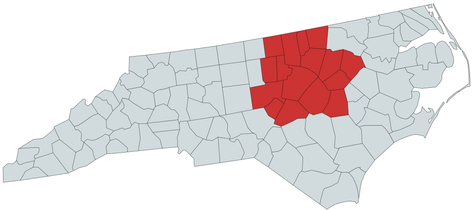
This guide is written for the people operating repeaters, companion radios, channels, and room servers inside the 16 counties covered by RDUMesh. It explains the region settings the mesh coordinators have agreed on, what each one means for your repeater, and how to configure your devices to match.
The important distinction is simple:
- A channel key controls who can read a channel message.
- A region scope controls which repeaters will forward the packet.
A region scope is not encryption, authentication, or a GPS geofence. It is a shared routing label. Every device that should participate in a scoped path must understand the label, and every repeater on that path must explicitly allow it.
The RDUMesh region vocabulary
The mesh coordinators have already decided the region vocabulary for RDUMesh. These are not suggestions to choose from. They are the names the network will use, and repeater and companion operators are being asked to apply the same settings on their own devices:
rdufor the RDUMesh service area, the 16 counties around Raleigh, Durham, and Chapel Hillus-ncfor North Carolinaus-southeastfor the Southeast mesh, which covers most of the Southeastern United Statesusfor the United States
The rdu region is the region of the RDUMesh network itself. Every repeater inside the 16-county RDUMesh service area should always have the rdu region scope configured. Repeater operators who want to carry all traffic for the state of North Carolina should also add us-nc.
Are you inside the RDUMesh service area? If you live in or operate a repeater in one of the counties below, the rdu settings in this guide apply to you. This is the same county list published on the RDUMesh About page.
| Primary service area | Extended service area |
|---|---|
| Wake | Chatham |
| Durham | Edgecombe |
| Orange | Franklin |
| Granville | |
| Harnett | |
| Johnston | |
| Lee | |
| Nash | |
| Person | |
| Vance | |
| Warren | |
| Wayne | |
| Wilson |
The three core counties, Wake, Durham, and Orange, form the primary service area around Raleigh, Durham, and Chapel Hill. The other thirteen counties form the extended service area. All sixteen share the same rdu region.
The larger regions are a deliberate choice, not a default. us-southeast is a very large region. Repeater operators should think carefully about whether they want to adopt it, because every repeater that allows it agrees to carry that region's flood traffic. The same is true of us: RDUMesh is not recommending that operators carry the us region scope.
These are names, not automatic geographic boundaries. MeshCore does not infer a region from a node's GPS coordinates. The name is the agreement.
Use the same spelling everywhere. The mobile app, repeaters, channels, and room servers need to refer to the same scope name. MeshCore's documented region names use lower-case letters, numbers, and hyphens, with a maximum length of 29 UTF-8 bytes. Region names must be exact and unique within the mesh.
This guide does not prescribe settings for repeater operators outside the RDUMesh service area. If you are in North Carolina but outside the 16 counties covered by RDUMesh, us-nc may be more appropriate for you, but check with your local coordinators before choosing.
How MeshCore uses a region scope
When a companion sends a scoped flood packet, MeshCore derives a transport code from the scope name and places that code in the packet header. A repeater checks the code against its configured region map.
If the repeater has that region and flooding is allowed for it, the repeater may forward the packet. If the region is not present, or if that region is denied, the repeater does not forward that scoped flood.
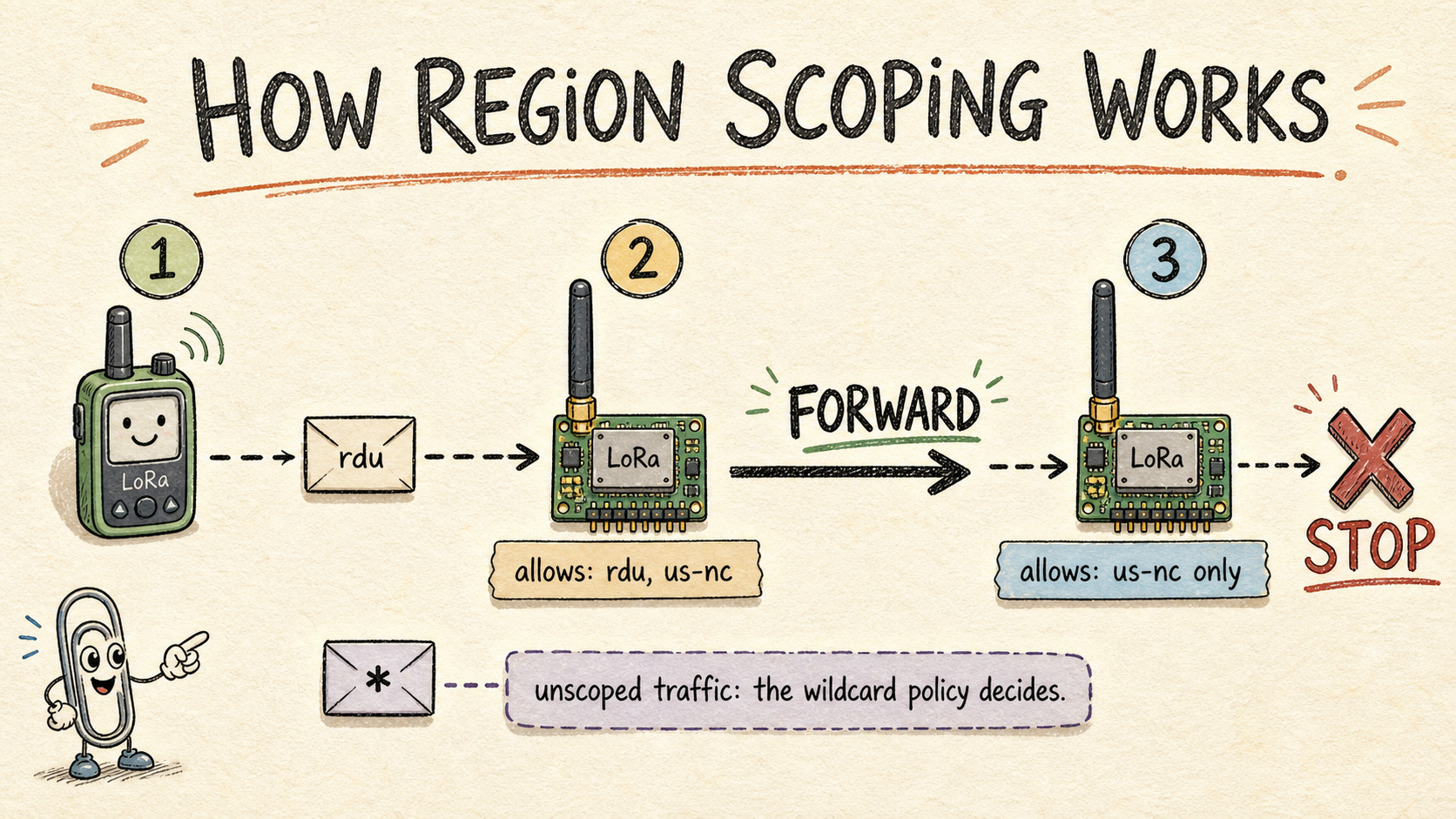
The channel's secret still does the encryption work. A repeater can forward an encrypted packet without being able to read the channel message.
The region tree is useful for organizing names, but do not treat parent and child names as interchangeable permissions. The forwarding code checks the matching region's own flood permission. If a repeater should forward rdu and us-nc, explicitly configure and allow both names. A boundary repeater may legitimately need both a parent region and one or more child regions.
Repeater settings
Repeater owners can administer a device through its USB serial console, the MeshCore configuration tools, or a remote administration session. The exact connection steps vary by hardware and client, but the region commands are the same.
The current MeshCore CLI reference labels region management as available from firmware 1.10 onward. The region list command requires firmware 1.12 or newer, and default-scope support was introduced in firmware 1.15. For the complete setup in this guide, use current repeater and room-server firmware, preferably 1.15 or newer. Always check the device's version before making a network-wide change.
1. Inspect the current configuration
Run these commands before changing anything:
ver
region
region list allowed
region default
Save the output somewhere. It gives you a record of the existing region tree, allowed scopes, and default scope before the change.
On current firmware, region list allowed is a local serial-console command. The remote CLI can still be useful for targeted get, put, allowf, denyf, and remove operations, but do not assume that a remote session can return the complete region list.
2. Add the scopes the repeater should forward
Every repeater inside the RDUMesh service area should carry the rdu region:
region put rdu
region allowf rdu
A repeater that is part of a state-wide backbone should also carry us-nc:
region put us-nc
region allowf us-nc
Do not copy every region to every device. An allow-list is a forwarding policy. Think carefully before adding us-southeast or us: every repeater that allows one of those regions agrees to carry that region's flood traffic, including traffic from far outside the Triangle.
Though this could be very useful. The popular channel `#hamradio` makes a lot of sense to carry over a larger area, for example.
region put creates a region with flooding enabled, and it also resets a previously denied region back to allowed. The explicit region allowf commands are optional; they mainly spell out intent. The one allowf that genuinely matters is region allowf * for the wildcard, because creating or redefining named regions does not change the wildcard's stored policy.
3. Set the repeater's default scope
For a local repeater operating inside the 16 counties covered by RDUMesh, the correct default is:
region default rdu
If you run one of the larger backbone repeaters in the region, or if you operate adjacent to other nearby meshes, you might opt for a scope like `us-nc` or even `us-southeast` as your default.
If you are in North Carolina but outside the RDUMesh service area, us-nc may be more appropriate, but check with your local coordinators. The default scope describes the repeater's own operating area, not necessarily the largest scope the repeater is willing to forward.
This setting does not replace the allow-list. A repeater can have rdu as its default while allowing us-nc as well, and it can allow a scope without using it as its default.
The default is not applied blindly to every response. If a repeater can resolve the scope of an incoming request, the response uses that same scope. If it cannot resolve the request's scope, the response is unscoped. The default primarily covers flood traffic that originates at the repeater, especially its advertisement.
4. Set the repeater's advert path hash size
RDUMesh recommends that repeater operators set their default announcement path hash size to 3 bytes:
set path.hash.mode 2
The MeshCore CLI maps the value 2 to a 3-byte path hash, which gives 16,777,216 unique IDs and a 21-hop maximum flood. This setting changes the ID encoding used in the repeater's own advertisements. It does not affect traffic coming from companions that still use a 1- or 2-byte path hash size, and it does not change which packet sizes the repeater forwards: on firmware 1.14 or newer, repeaters forward all hash sizes.
The point of the 3-byte advertisement is disambiguation. A larger hash makes it easier to tell which repeater is advertising and where it is located on the map, instead of guessing among repeaters whose 1-byte hashes collide.
5. Save and verify
Persist the region changes and inspect the result:
region save
region list allowed
region get rdu
region get us-nc
region default
get path.hash.mode
Run region get only for the scopes that should exist on that device. The result should show the scope and its flood permission. If you changed the default scope or the path hash, send a fresh advertisement after the change:
advert
The commands verify the local configuration. They do not prove that an end-to-end radio path exists. Test a real scoped message after the repeaters in the intended path have been configured.
The wildcard region and the RDUMesh migration plan
Companion devices use the wildcard, unscoped region by default. Older companions and channels may continue to send unscoped flood packets. MeshCore represents that traffic with the wildcard or null region, *. Despite the name, * is not an allow-all entry for every named region. It matches flood packets with no region transport code. Named scoped packets still need their own matching, flood-allowed region entry.
For now, RDUMesh will continue to allow the wildcard, unscoped region:
region allowf *
region save
That keeps legacy unscoped traffic working while companions and channels are updated. It also means that unscoped traffic is still allowed to cross the repeater, so the network is not a strict region boundary yet.
At some point, the major repeaters in the area will coordinate with one another and begin to disallow unscoped wildcard traffic. The timing is a coordinated decision, not something one owner should make for the whole network. The best way to stay on top of these settings is to follow the RDUMesh website, subscribe to the newsletter, or join the Discord server; there is a link on the website.
If you run a local repeater and are feeling overwhelmed by out-of-state and out-of-town traffic, you can opt to start disallowing wildcard traffic now:
region denyf *
region save
You should see your channel traffic, as well as your flood traffic, reduce substantially. There is a gotcha: companion devices use wildcard region scoping by default. As soon as you disallow the wildcard region scope, it affects every companion device that has not been updated to use the rdu region scope. If you operate a repeater for other people in your area, make sure they are setting their companions to use the rdu region scope.
Firmware 1.16 also adds a softer migration control:
get flood.max.unscoped
set flood.max.unscoped 3
This limits an unscoped flood to the specified hop count instead of stopping unscoped flooding at the first repeater. The official CLI reference uses 3 as an example of a local unscoped range. Use this when the community wants a transition period with short-range legacy traffic. Use region denyf * when the policy is to stop unscoped flood traffic entirely.
To roll back the local default as well as the wildcard policy:
region default <null>
region allowf *
region save
That restores unscoped default flood behavior for the node. It does not remove the named regions from the device.
Companion settings
The companion app's region controls are currently under an experimental settings screen. The labels may move as the app changes, but the workflow is:
- Open the MeshCore companion app.
- Tap the gear icon to open Settings.
- Scroll to Experimental Settings.
- Open Default Region Scope.
- Tap the add button.
- Add the region names used by your mesh. Inside the RDUMesh service area, add at least
rdu. - Select the scope that should be the companion's normal default. Inside the RDUMesh service area, that is
rdu.
The companion's default scope is the normal outgoing flood choice. It does not automatically assign a scope to every channel. Channel scopes are configured separately.
Default-scope support for the mobile app was introduced in the MeshCore app 1.43.0 release. The current app may expose the same control under a slightly different label, but the setting belongs in the experimental settings area.
Set the companion's path hash size
RDUMesh recommends that companion devices use at least a 2-byte path hash size to avoid ID collisions. Three bytes is okay as well and can reach across the state with no problem. On the companion, this is the Default Path Hash Size setting in the same experimental settings screen.
MeshCore's official FAQ says that firmware 1.14 and newer, together with MeshCore app 1.41.0 or newer, can use one-, two-, or three-byte path hashes. It also warns that older repeaters silently drop packets using two- or three-byte path hashes. The documented hop limits are:
| Path hash size | Maximum encoded hops | Compatibility |
|---|---|---|
| 1 byte | 64 | Works with older and newer repeaters |
| 2 bytes | 32 | Requires firmware 1.14 or newer along the path |
| 3 bytes | 21 | Requires firmware 1.14 or newer along the path |
A 2-byte hash supports 32 encoded hops, and a 3-byte hash supports 21. Both are sufficient for state-wide reach on this network. The path-hash setting is a compatibility decision, not a region scope: do not confuse the two, and do not change a repeater's path.hash.mode as a substitute for configuring regions.
Assign a region to a channel
Channel scope is a companion-side setting. Once the companion has the agreed region names, assign a region to each channel that should use one.
Using the Public channel as an example:
- Open the channel.
- Open the channel's three-dot menu.
- Choose Set Region Scope.
- Select the region created earlier. For a channel whose traffic should stay inside the RDUMesh service area, use
rdu. - Return to the channel and confirm that its header shows the assigned region, for example
Region: rdu.
Repeat this for each channel. A channel with no region scope remains an unscoped flood channel, subject to the wildcard policy on the repeaters it encounters.
The channel region should be allowed by every repeater that is expected to carry that channel's traffic. If the channel is assigned us-nc but an intermediate repeater allows only rdu, the packet can stop there even though both endpoints are members of the channel.
This setting does not change the channel secret or add members to the channel. It changes the routing scope of messages sent on that channel. The channel key still determines who can decrypt them, and the app's scope setting does not prevent you from receiving channel messages sent from elsewhere in the mesh.
MeshCore's current QR-code documentation also includes an optional region_scope field for channel links and identifies support in MeshCore App 1.47.0 and newer. That makes scoped channel definitions shareable, but it does not remove the need to configure the corresponding scopes on the repeaters.
Room server settings
A room server needs the same region vocabulary, but its default-scope choice has a different operational consequence. A room server stores posts and later pushes them to clients. When it does not have a direct path to a client, the current MeshCore room-server implementation sends that push using its default scope.
For a room server serving the RDUMesh service area, the default is rdu. The same guidance applies as for repeaters: inside the 16 counties, rdu is the right default, and a room server whose audience is state-wide may use us-nc after checking with the local coordinators.
A room server serving the RDUMesh service area might be configured like this:
region put rdu
region allowf rdu

region put us-nc
region allowf us-nc

region default rdu
region save

region list allowed
region default
advert
The server should allow the scopes used by clients that need to reach it, and its default should be broad enough for the posts it needs to push. If the server's default is rdu but the intended clients are reached only through us-nc repeaters, those clients may not receive flood-based room updates.
The default scope is not blindly applied to every response. When the room server can resolve the region of an incoming request, its response uses that same scope. If it cannot resolve the request's scope, the response is unscoped. This behavior matters when planning a migration because administrative requests and room-post pushes follow different rules.
A room server is not a replacement for a repeater. The official MeshCore FAQ recommends running repeater and room-server firmware on separate devices. Do not enable repeating on a room server merely to compensate for an incomplete repeater deployment.
A rollout order that avoids surprises
Region scoping works best as a coordinated change rather than a setting that one person flips on one radio.
- Verify the region names with the RDUMesh coordinators and confirm which regions your repeater should carry.
- Inventory repeater and room-server firmware versions. Update the infrastructure to at least the firmware level needed for the features you are using. A pre-1.10 repeater does not perform the newer scoped-packet filtering, so scoped packets can leak through it.
- Configure the named regions and defaults on repeaters and room servers first.
- Set repeater advert path hashes to 3 bytes.
- Keep the wildcard allowed for now. RDUMesh will coordinate the cutover timing.
- Add the same region names to companion apps and set companion path hashes to at least 2 bytes.
- Assign scopes to channels one channel at a time.
- Test a scoped message through the intended path.
- Only consider denying unscoped flood traffic as part of the coordinated network-wide cutover.
For each device, record three separate decisions:
- Which named regions may this device forward?
- Which region is this device's default for its own flood traffic?
- Which channels or services should use each region?
Those questions are related, but they are not interchangeable.
Troubleshooting
A scoped channel works nearby but not through the mesh
Check the exact scope spelling on the channel and on every repeater in the expected path. Then run region list allowed on the relevant repeaters. A repeater that does not list the channel's scope will not forward that scoped flood.
Also check whether a repeater in the path has denied the wildcard while the sender is still using an unscoped channel.
The channel works with one repeater but fails after a path-hash change
Return the companion to a smaller path hash and test again. If the message returns, the path probably includes a pre-1.14 repeater that silently drops larger path hashes. Upgrade the path's repeaters before attempting the recommended 2- or 3-byte migration.
A room server is reachable, but clients do not receive later posts
Check the room server's region default and the scopes allowed by the repeaters between the room server and its clients. A room server's default scope affects flood-based post pushes. A successful login or direct path does not prove that later flood pushes use the desired region.
A repeater still carries traffic from everywhere
Check whether * is allowed. region list allowed will show whether unscoped flood traffic is still permitted. If the wildcard is allowed, named scopes do not prevent unscoped packets from crossing the repeater. This is the current RDUMesh default: the wildcard remains allowed until the coordinated cutover.
Also check the firmware of every repeater on the path. Repeaters older than 1.10 predate the region-filtering behavior and can forward scoped packets without applying the newer region policy.
Setting a default did not make a channel scoped
The companion default and the channel's region scope are separate settings. Set the channel's Set Region Scope value explicitly and confirm the region label in the channel header.
The short version
For a repeater inside the RDUMesh service area, run the whole sequence in order. Include the two us-nc lines only if the repeater should also carry state-wide traffic. The region allowf * line keeps unscoped traffic flowing, which is the current RDUMesh policy until the coordinated wildcard cutover; operators who deliberately opt out early can replace it with region denyf * (see the wildcard section). The last four commands verify the result, and the advert broadcasts the new configuration:
region put rdu
region allowf rdu

region put us-nc
region allowf us-nc
region allowf us
region allowf us-southeast

region allowf *
region default rdu
set path.hash.mode 2
region save

region list allowed
region default
get path.hash.mode
advert
Prefer a shorter sequence? On firmware 1.16 or newer, region def creates the same regions in one command. Regions it creates are flood-allowed by default, and the change still needs region save to persist:
region def rdu|* us-nc|* us|* us-southeast|*
region allowf *
region default rdu
set path.hash.mode 2
region save
advert
The verbose sequence is the safer default because it is easier to review. Its extra allowf lines are optional, since region put and region def already create regions flood-allowed and reset previously denied ones; the region allowf * line is the one that matters, because it restores the wildcard policy explicitly. The |* in region def returns the cursor to the root so each name becomes a top-level region rather than a nested child.
For a companion:
- Add
rduunder Settings → Experimental Settings → Default Region Scope. - Choose
rduas the normal default. - Set the companion's path hash size to at least 2 bytes.
- Assign a region scope to each channel that should use one.
For a room server:
- Configure the same named regions with the CLI.
- Allow the scopes used by its clients.
- Set its default to
rdu. - Save and send a fresh advert.
Region scoping is most useful when it is treated as a network contract. The RDUMesh coordinators have defined the names once. Configure the infrastructure deliberately, keep the wildcard until the coordinated cutover, and migrate path hashes as a separate, deliberate decision.
Sources
- RDUMesh, the network this guide applies to: community-owned, off-grid radio communications infrastructure across the North Carolina Piedmont, serving the Raleigh, Durham, and Chapel Hill area.
- About RDUMesh, the source of the 16-county service area list: Wake, Durham, and Orange as the primary service area, with Chatham, Edgecombe, Franklin, Granville, Harnett, Johnston, Lee, Nash, Person, Vance, Warren, Wayne, and Wilson as the extended service area.
- MeshCore CLI reference, including region management, wildcard behavior, defaults, unscoped-flood limits, and path-hash commands.
- MeshCore region-filtering article, the primary explanation of region names, repeater filtering, hierarchy, and the migration from unscoped flood traffic.
- MeshCore default-scope article, covering companion, repeater, and room-server default scope behavior and the firmware 1.15 feature gate.
- MeshCore FAQ, including firmware and app version guidance for path hashes, repeaters, room servers, and regional migration.
- MeshCore 1.16 release notes, documenting
flood.max.unscopedand theregion defcommand. - MeshCore QR-code documentation, including the optional channel
region_scopefield and mobile-app support note. - MeshCore region-map implementation, which derives transport keys and checks each matching region's flood permission.
- MeshCore repeater implementation, including default-scope advertisements and scoped packet filtering.
- MeshCore room-server implementation, including default-scoped flood pushes to clients.
Draft checked against the supplied three-page region setup guide and MeshCore's current public documentation and source on August 7, 2026.